HandlerMapping
You should understand what HandlerMapping is for before building api version technique in your project. The process from taking the client requests to returning the response in Spring framework is roughly same with the below.
- HandlerMapping
- HandlerAdapter
- ViewResolver // It’s the post processing
Furthermore, You also should know about DispatcherServlet. It’s offered from Spring Framework and This object control all of the requests and the responses in Spring. so what i am saying is HandlerMapping, HandlerAdapter and ViewResolver will be controlled by DispatcherServlet. Actually, DispatcherServlet is the sub-class of the Servlet offered from Java official SDK.
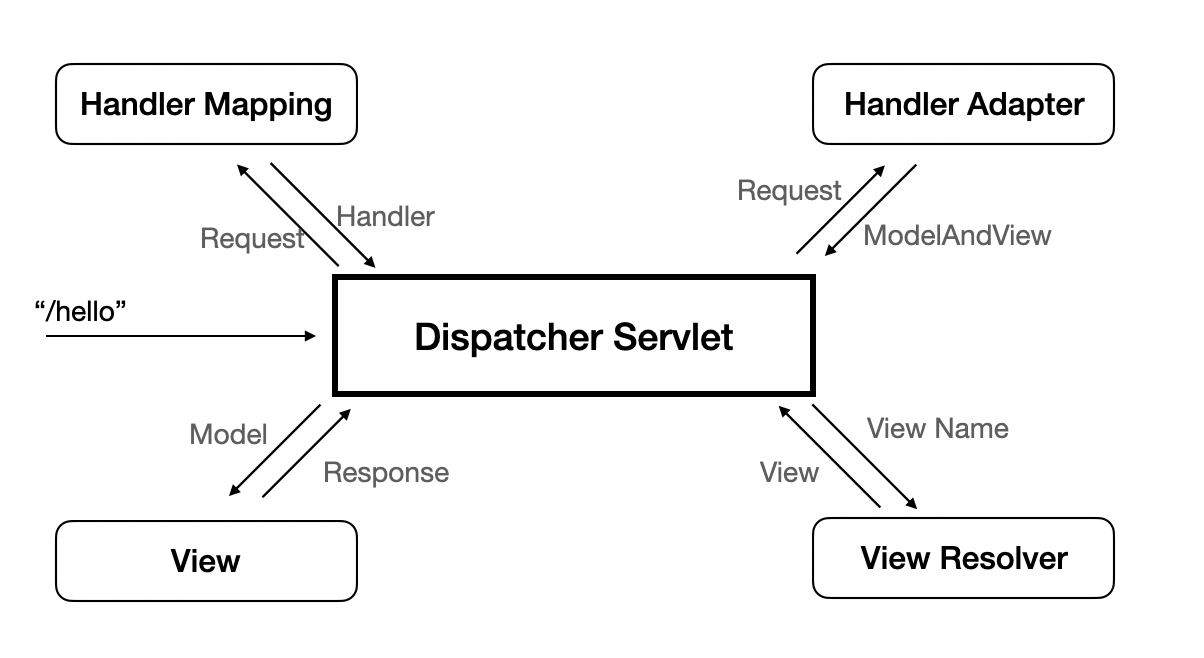
The purpose of HandlerMapping is for connecting between each the urls in request of clients and each the controllers to process for the request. and HandlerMapping will be started when the your Spring project is launched. and After the setting of HandlerMapping, All of urls in requests will be mapped with the controllers managed by HandlerMapping.
The sort of Implementation of HandlerMapping.
Most of Spring developers will use RequestMappingHandlerMapping via @RequestMapping annotation.
It is the famous one of implementation of HandlerMapping. but I guess you wouldn’t know about the fact Spring Framework offers many kinds of implementation of HandlerMapping not only RequestMappingHandlerMapping. I will introduce them briefly.
- BeanNameUrlHandlerMapping
The policy of it is the bean name is used as request urls. This strategy of HandlerMapping has the one condition you should know before you use it. That is the bean name should always include the slash (“/“) in front of itself.
1 |
|
- SimpleUrlHandlerMapping
This strategy you can initialize the relation between request urls and the controllers when this HandlerMapping is created with Map data type. (Map type express the key-value data type)
1 |
|
- RequestMappingHandlerMapping
It is most famous one of implementation of HandlerMapping. You would use this one if you haven’t considered HandlerMapping ever. This implementation of HandlerMapping strategy is relation between urls and controllers are mapped by @RequestMapping annotation. This strategy might be used Java Reflection technique to map them via @RequestMapping. and This strategy also offers another annotation to map like @PostMapping, @GetMapping … and so on. but You should know they are based on @RequestMapping. I mean They are created via @RequestMapping.
1 |
|
Api Versioning with customizing HandlerMapping
We will customize RequestMappingHandlerMapping to control api version as we want. api version information is can located any where in requests like the header, the parameters or in urls.
but just only adding the version data into urls cannot control api version with flexibility. for example when you call the api that doesn’t be built in your system then the clients will take the response with 404 http status code. to solve this inconvenience, how about changing to the latest api version when api version requested is not existed.
We have to customize RequestMappingHandlerMapping to implement it. the below code is my answer of considering about this problem.
I created totally 5 objects to implement it as you can watch in the below.
ApiVersion annotation is only for putting the api version in there. We will not use the way putting api version i said before like the header, the parameters or in urls of requests. because these way can’t overlapped between each same apis.
1 |
|
Version class is just a domain class only for expressing Version itself. This class implements Comparable interface. It means the function that compare with same type is needed in our business.
1 | public class Version implements Comparable<Version> { |
VersionRange class has two Version typed variables. It is to show the api version ranges acceptable in your system. for example if one api is created from v1 to v10, then VersionRange class for this api will have the data like the below.
- from = 1
- to = 10
1 | public class VersionRange { |
and lastly the below two classes ApiVersionRequestMappingHandlerMapping, ApiVersionRequestCondition have our main business logic. ApiVersionRequestCondition.getMatchingCondition() method always is called whenever client requests are occured. request parameter in this method have the information associated with the client requests like the url or the parameters and so on. if this method returns same ApiVersionRequestCondition object for same client requests then ApiVersionRequestCondition.compareTo() method is called. and compareTo() method will decide what condition is best to each requests among duplicated ApiVersionRequestCondition.
1 | public class ApiVersionRequestMappingHandlerMapping extends RequestMappingHandlerMapping { |
1 | public class ApiVersionRequestCondition extends AbstractRequestCondition<ApiVersionRequestCondition> { |
finally you should put api version with asterisk (“*”) in each urls. It will make the overlapped ApiversionRequestCondition when getMatchingCondition() method is called.
1 |
and Don’t forget to register ApiVersionRequestMappingHandlerMapping to notice to Spring.
1 |
|
if you use latest Spring boot version, the below option is required by the spring policy changed.
1 | spring.main.allow-bean-definition-overriding=true |